/web-performanceWeb performance — Core Web Vitals
Web performance
We measure what makes your site slow on mobile, fix it in the code and measure again.
- LCPThe main content shows up
- INPThe page responds when you tap
- CLSNothing jumps while you read
Definition
What is web performance?
Web performance is how quickly a page shows up, responds and settles for the person visiting it. Google measures it with the Core Web Vitals: LCP, when the main content appears; INP, when the page responds to a tap; and CLS, whether the content jumps around. Improving it means finding what holds it back and fixing that in the code.
LCP, INP, CLS
What’s included
The core of it
Diagnosis with real data
Lighthouse on PageSpeed Insights and, where available, real Chrome data (CrUX).
LCP: what shows first
Right-sized images, fonts and a server that don’t keep you waiting.
INP: quick to respond
Less JavaScript up front and long tasks split: every tap responds.
CLS: nothing jumps
Space set aside for images, widgets and banners before they arrive.
Measured before and after
The same tests again, showing what changed.
Technical audit
Start by measuring your site
The audit runs Lighthouse from your browser and tells you what slows the page.
Who it’s for
It’s for you if
Your site takes a while to show up on mobile.
PageSpeed or Search Console flags pages in red.
Buttons are slow to respond or content jumps while loading.
It’s not for you if
- You want a guaranteed score: performance isn’t promised.
- You want to climb Google with content: that’s Somia Digital.
How we work
Step 1: We measure
Lighthouse and real Chrome data on the key pages.
Step 2: We prioritise
What slows it down most and what’s cheapest to fix, in writing.
Step 3: We fix
In the code: images, fonts, JavaScript, server and caching.
Step 4: We measure again
The same tests, so you can see the difference.
What we measure with
- PageSpeed Insights
- CrUX
- Next.js
- WebP and AVIF
- Cloudflare
What we use each tool for
- PageSpeed Insights
- Lighthouse on mobile: LCP, CLS, TBT and fixes.
- CrUX
- Real Chrome user data, given enough traffic.
- Next.js
- Pages rendered server-side or ahead of time.
- WebP and AVIF
- Images sized per screen, and deferred off screen.
- Cloudflare
- Cache and CDN in front of the site.
Live
The technical audit, built here
Our tool: Lighthouse from your browser, real Chrome data when available, and security checks.
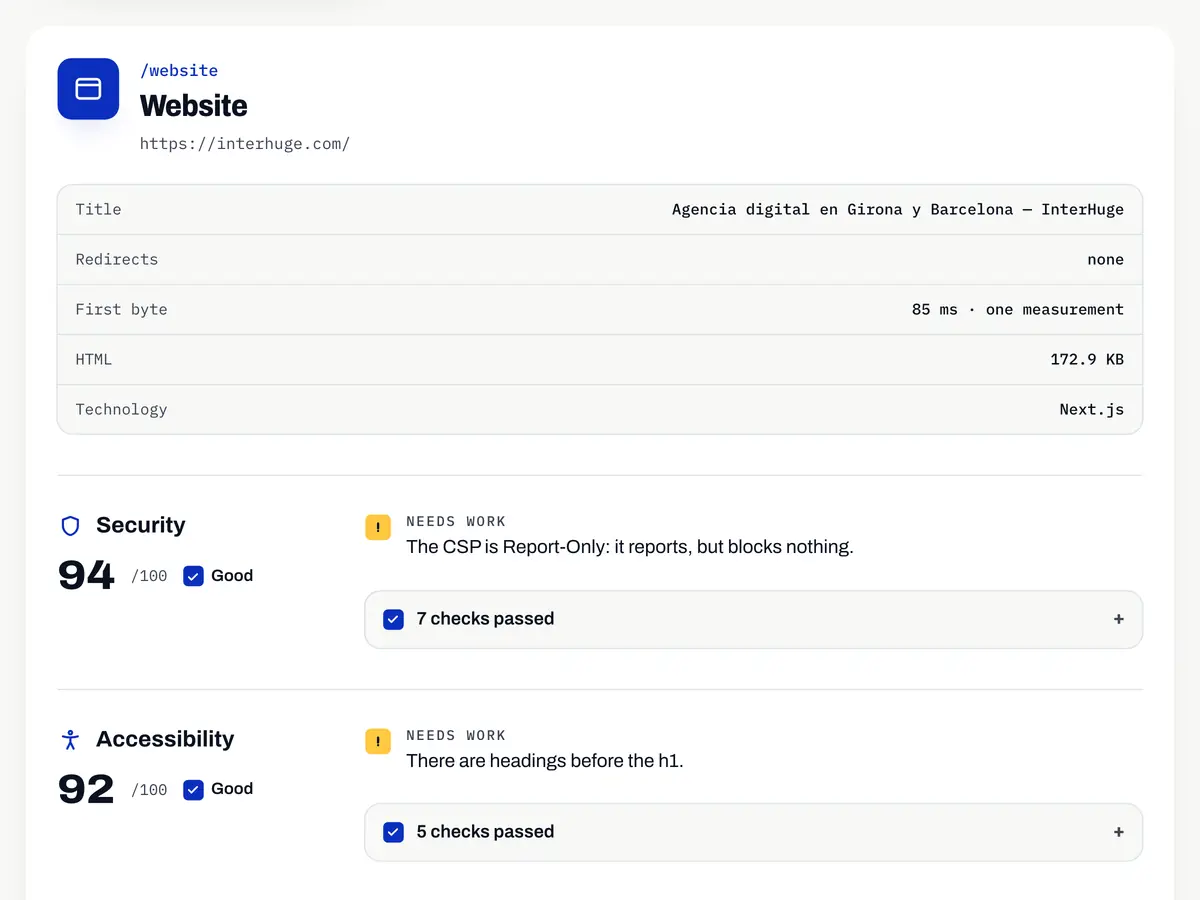
- Performance
- Lighthouse on PageSpeed Insights, mobile: LCP, CLS, TBT and what can be improved
- Real data
- CrUX, when Google has it: LCP, INP and CLS from Chrome users
- Also
- Security, accessibility, technology, domain and hosting
Further reading
Lab tests and real data
Lighthouse measures the page on a simulated phone: it’s good for finding what holds it back, but every run gives a slightly different result. Real Chrome data (CrUX) tells you how visitors actually experienced it, and only exists once a site has enough traffic. We look at both and follow the trend, not a single run. That way, when an improvement works, it shows up on both sides.
Frequently asked questions
What are the Core Web Vitals?
Three Google measures of how a page feels: LCP, when the main content appears; INP, when it responds to a tap or click; and CLS, whether the content jumps around while loading.
Can you guarantee a PageSpeed score?
No. Lighthouse varies from run to run and depends on the device and the network. What we do is find what slows the site down, fix it and measure again with the same tests.
Do I need a new website to make it fast?
Not always. Many improvements happen in the code you already have: images, fonts, scripts or caching. If the site can’t go further, we’ll tell you, with the measurements in hand.
Do you work on websites you didn’t build?
Yes, as long as we have access to the code and the hosting. We measure it first and tell you what can be improved and what can’t.
What if my site runs on WordPress?
It can be improved, but the theme and plugins often hold it back. If it has to be very fast and do things of its own, a bespoke website may suit you better.
Can I measure it myself?
Yes: our technical audit runs Lighthouse on PageSpeed Insights from your browser. If the site has enough traffic, you’ll also see it in Search Console.
First stepWeb performance
Is your website slow?
Send us the pages that worry you most and we’ll say what slows them.